evl-lib
4. Symbols and resources
@Flow builds the structure. @EVL.* annotations only decide how a box is drawn. EVL never looks at Spring, Micronaut, Ktor, JPA or any other framework annotation; tag what matters with EVL’s own.
The symbols
| Annotation | Put it on | Drawn as |
|---|---|---|
@EVL.Endpoint(method, path, caller, description) |
the method that serves a request (prefix path may sit on the class) |
box with METHOD /path; caller adds a stick figure |
@EVL.Job(schedule, trigger, description) |
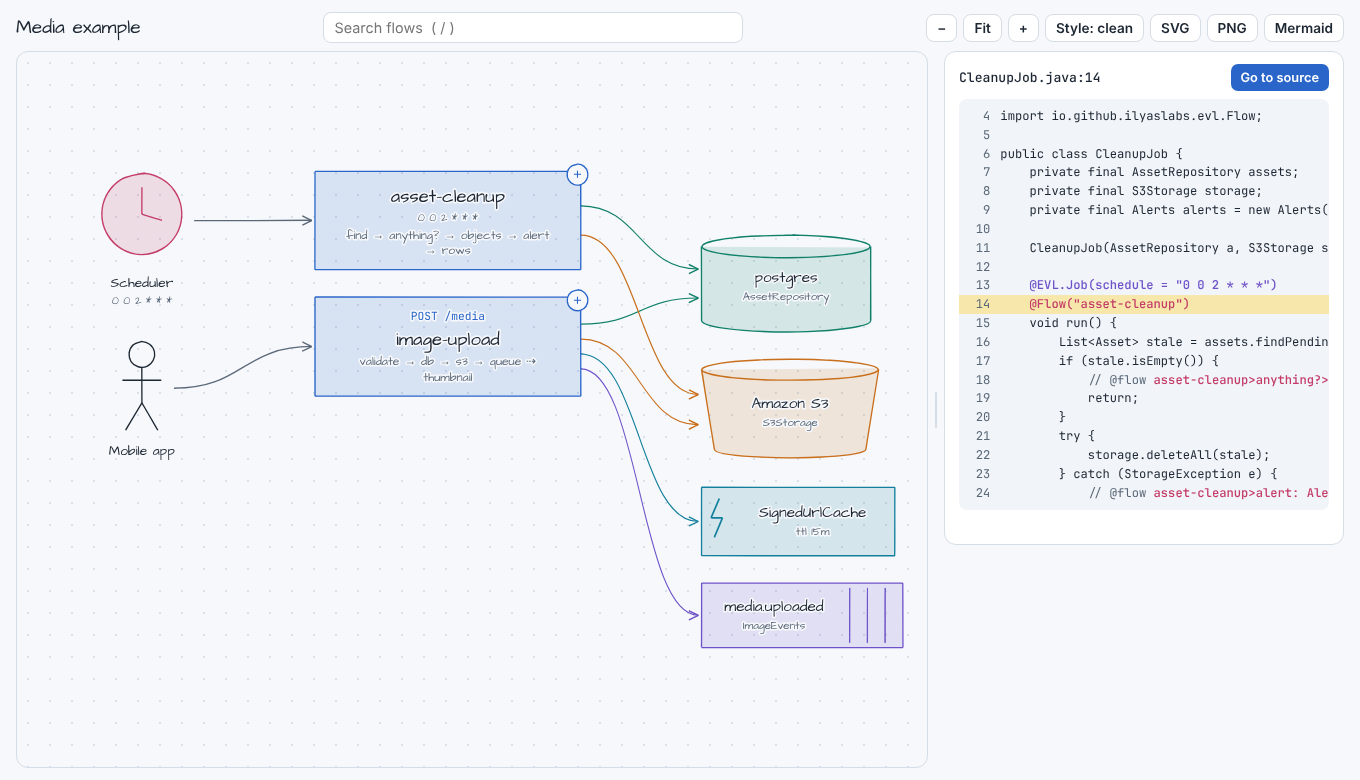
a scheduled or triggered job method | clock; the schedule or trigger shows under it |
@EVL.Database(value, table, description) |
a repository or DAO class or interface | cylinder |
@EVL.Storage(value, description) |
a file or object storage client | bucket |
@EVL.Queue(value, description) |
a publisher or consumer of a topic or queue (repeat it for several topics) | pipe |
@EVL.Cache(value, ttl, description) |
a cache | lightning bolt |
@EVL.External(value, description) |
a client for a third-party service | cloud |
@EVL.Interface(value, description) |
a port or API boundary | box with a lollipop |
@EVL.Service(value, description) |
a component worth showing as a box | box |
@EVL.Actor(value, description) |
a person or system that calls in | stick figure |
value is the name shown on the map. If you leave it out, the class name is used.
Resources
Database, Storage, Queue, Cache, External, Interface and Service are resources. You mark a resource once, on its class:
@EVL.Database("postgres")
public class AssetRepository { ... }

@EVL.Storage("Amazon S3")
public class S3Storage { ... }

@EVL.Queue("media.uploaded")
public class ImageEvents { ... }
Then EVL does the rest:
- Arrows for free. A step whose code calls into a resource class gets an arrow to that resource. You don’t tag every repository call.
- One resource, many classes. Classes with the same kind and name are one resource. Two repositories both marked
@EVL.Database("postgres")point at the same cylinder. - Interfaces count. Mark the interface (
@EVL.Database("postgres") interface AssetStore) and every class that implements it belongs to the resource. - Colours. Arrows take the colour of the resource they point at, so you can follow “everything that touches S3” at a glance.
Steps that are a resource
When a @Flow method lives in a resource class, the step is drawn as that resource, with what it does as the caption:
@EVL.Database("postgres")
public class AssetRepository {
    @Flow(value = "image-upload>db", label = "Save pending asset")
    public Asset savePending(UploadRequest r) { ... }
}
On the image-upload level, step 2 is the postgres cylinder captioned “Save pending asset”.
Callers and jobs
The left edge of the map shows who starts each flow:
caller = "Mobile app"on an endpoint draws a stick figure with that name. Endpoints with the same caller share one figure.@EVL.Job(schedule = "0 0 2 * * *")draws a clock with its schedule.@EVL.Job(trigger = "media.uploaded")describes a job started by an event (see chapter 5).
Next: Async steps and jobs